How the Google Ads audit works
You connect your account, we read all of it and you decide. We never touch anything: in a minute you get what is broken, what it costs and in what order to fix it.
You connect
With your Google account. No card. If you manage several accounts or an MCC, you pick which one.
We read your account
116 checks on your last 30 days: campaigns, keywords, searches, ads, locations, hours, tracking and catalogue. It takes a minute.
You decide
We hand you the plan ordered by money, with where to change each thing in Google Ads. Applying it is up to you, with the chat and the watchdog as a safety net.
What everyone asks before connecting
No. Google does not offer a read-only permission for Google Ads, so its consent screen mentions editing: you get the same with any tool you connect. AdPredictor changes nothing in your account: it reads it and tells you what to change and where. You apply the changes, or you don't.
You can, and for one-off questions it is fine. The difference: an MCP opens the door to your data, and you still have to know what to ask, with which thresholds, and come back next week. We ask the 116 questions every time, with the numbers computed by a program (not improvised by an AI), tell you what to change and where, ordered by the money that goes through each item, and keep watching your account every night. We compare it point by point below.
No. We never appear as a user or a manager of your Google Ads account. Whoever else manages it with you will not see that you connected us. And you can revoke access anytime from your Google account.
We do not call, we do not chase, and we do not manage anyone's campaigns. You know how this usually goes: someone offers a free audit and what they want is your account. We give you the report and that is it.
Sign in with the email that manages them and we show all of them in one selector, grouped by manager; you pick one and we audit it. Each account gets its own report, chat and watchdog, and the more accounts, the less each one costs. All on the same invoice. When a client leaves, you freeze that account and it stops counting.
Google gives you recommendations, and many of them expand your spend or hand over control of your bidding. We tell you which spend brings you no customers, which is exactly what Google has no interest in pointing out. And we warn you about what Google will change on its own, like moving you to AI Max or broad match, with the date.
It can happen. If you start the trial and it is not useful, cancel from your settings within the 14 days and you pay nothing.
If you do not start the trial, after 48 hours we delete the detail of your account: campaigns, keywords and search terms. If you do, the data is kept for as long as your Live audit lasts so the report stays alive. It travels encrypted and we comply with GDPR.
What you see in the full report
Each block, with its real screenshot from the report.
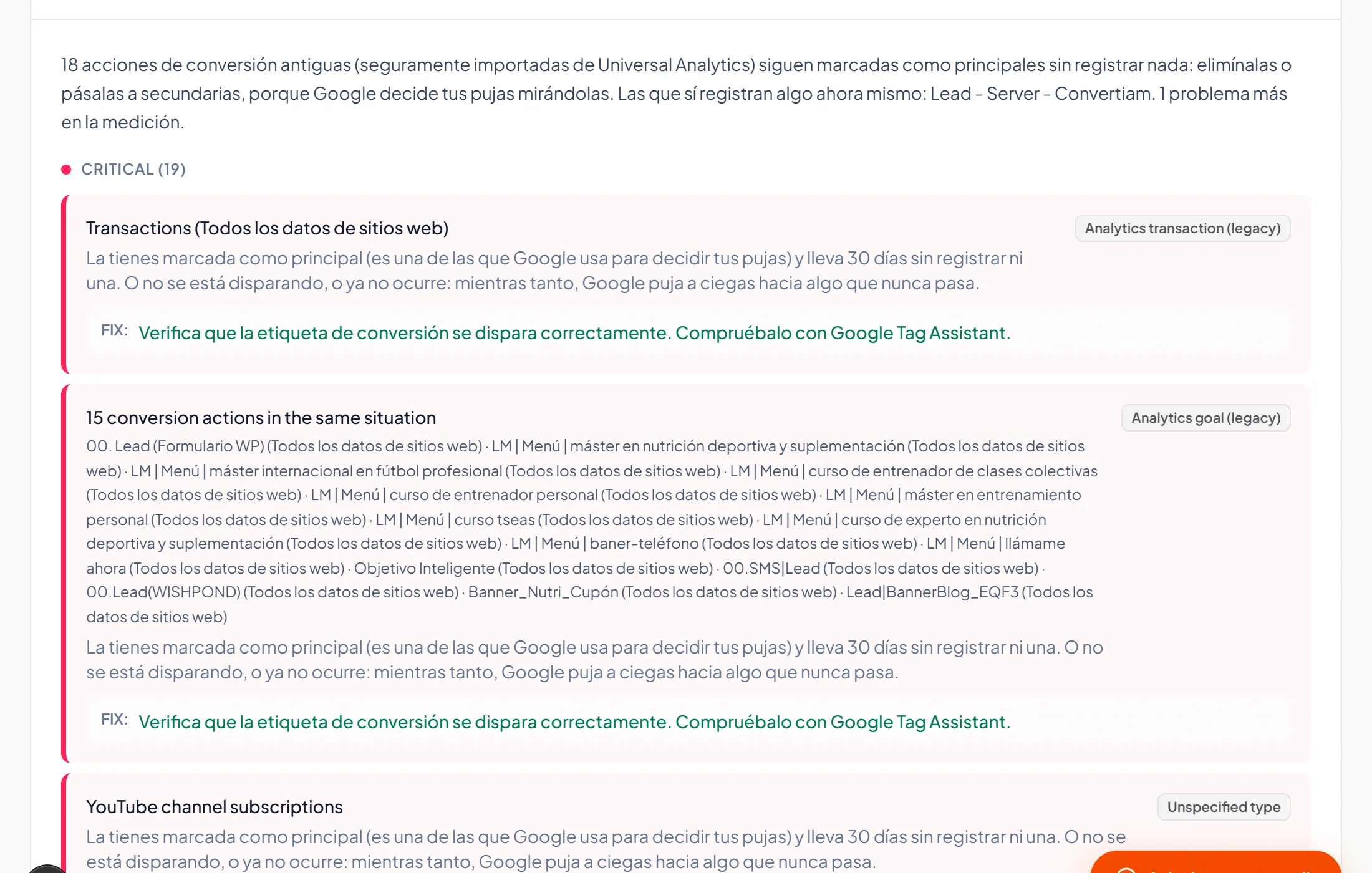
What Google counts as a conversion in your account and what may be mismeasured: forms and calls counted several times for the same person, primary goals with no conversions in 30 days, the conversion window, the attribution model that drives bidding. Without this, everything else misleads.
The real searches you paid for, what each one spent, and the verdict: add as negative, create as keyword, or watch. Up to 3,000 searches, and how much of your spend goes to searches Google hides.
Up to 10,000 keywords, each with its spend, its conversions, Google's score and what to do with it: pause, lower the bid, change match type or expand. We show you how much each keyword, each search term and each campaign has spent without any conversion.
What works, what does not and why, one by one, with its cost per conversion and its verdict. Search, Shopping, Performance Max, Display, Demand Gen or Video: we go deepest in Search today; in the other types the detail is lower, and where there are no keywords the creatives are graded one by one, which is the only lever there. Brand is treated apart, and enabled campaigns that never show are flagged with the reason.
How your catalogue is divided in Shopping and Performance Max, which group sells and which only spends, what the “Everything else” bucket takes, whether Performance Max and Shopping bid on the same products, and which audience signals you gave Google.
Cities, not just regions, that spend without bringing customers; how much people outside your area spent; hours and days that only eat budget; devices whose cost per customer doubles the rest; and whether your campaign reaches people merely “interested” from outside.
What is happening in your account, explained in plain language with your names and your figures. It includes who touched the account in the last 28 days and what changed, and whether Google switched on AI Max for you or has it scheduled.
Measure right first, then stop losing money, finally earn more. Within each block, ordered by the money that goes through each item, with where to change it in Google Ads.
The whole report as a PDF and the data as Excel (sheet by sheet, catalogue included). Yours forever, even if you do not stay with us.
And after the report, you are not on your own
It comes inside the Live audit: 14 days free, then a monthly fee per account. If you cancel, you keep your latest report.
Chat with your data
Ask anything about your account and it answers with your figures: which searches to block first, which product to pause, how a campaign is doing. It searches any keyword or search term we read, not just the top spenders. Up to 300 questions a month.
A watchdog every night
Every night we look at what happened yesterday and, if something is out of the ordinary, we write to you first thing in the morning: spend spikes, two days without conversions when you normally get them, or several keywords spending without bringing a single conversion. On Mondays, a summary of the week.
Comparison over time
Every report shows, next to your current figures, those from the previous 30 days (on the same active campaigns) and, as a reference, those from the same period last year.
Why not connect an MCP and ask an AI?
For one-off questions, an MCP is fine. For an audit and its follow-up, this is what changes.
What gets reviewed
With an MCP and a chat: Whatever you think of asking. What you do not ask never shows up.
With AdPredictor: All 116 checks, every time, in the same order. Published at /checks.
The numbers
With an MCP and a chat: Added up by a language model: it rounds, skips rows, sometimes invents.
With AdPredictor: Computed by a program. The AI only writes about figures already calculated.
What you get
With an MCP and a chat: A text. Turning it into tasks, and knowing where each one is done, is on you.
With AdPredictor: A verdict per element and where to change it, ordered by the money that goes through each item. As PDF and Excel.
Risk
With an MCP and a chat: Many MCPs execute changes: one badly worded message can pause campaigns.
With AdPredictor: AdPredictor changes nothing in your account: it only reads it.
Who it is for, and who it is not for
It will help you if
- You run your own Google Ads account and do not know if you are doing it right
- You invest every month and feel part of it brings no customers, but do not know which part
- You sell with Shopping or Performance Max and only see the total, not which product spends without selling
- You manage client accounts, standalone or under an MCC, and want a fast review of each one
- You are about to hire an agency, or switch, and want to know what is broken first
It will not help you if
- Your account has almost no spend or clicks: with no data there is no audit, and we will say so
- You want someone to run your campaigns: we do not manage anyone's campaigns
- You want to audit Meta or TikTok: we do Google Ads and nothing else, so we can go deep
- You expect us to apply the changes: you decide and you do that
See how much you spend without getting customers
Free, no card, and nobody will call you.
To send you the report. No password, no account.
We share your sign-up, encrypted, with ad platforms to measure our ads. Privacy