How much you spend on Google Ads without getting customers
Ask the AI behind our Google Ads audits. Free, nothing to connect, no sign-up.
Or start with a suggested question
AI assistant, not a person: check it before applying anything. We keep the questions to improve the chat. Do not type personal or client data.
And with your real figures?
Connect your Google Ads account and in 60 seconds you have your score, the figure you spend without getting customers and what to change first.
To send you the report. No password, no account.
We share your sign-up, encrypted, with ad platforms to measure our ads. Privacy
No card · Nobody will call you · We never touch your account · If you do not start the trial, we delete your account detail after 48 h
I would rather see a sample report firstAfterwards, if you want, 14 days free of the Live audit: the full report, the chat in your language and the nightly watchdog. Card required, nothing charged until day 15.
It talks about your business, not Google Ads in general
Online store
You sell with Shopping or Performance Max, you see the total spend and do not know which product is costing you money.
See its exampleLead generation
You pay for forms and calls, many are not customers, and Google bids while learning from them.
See its exampleSaaS and software
You get sign-ups and free trials, but do not know which ones end up paying or which keywords bring them.
See its exampleTraining and schools
Each enrolment costs more every month and you do not know if it is the campaign, the ad or the page.
See its exampleAgency or freelancer
You manage several accounts, inherit others, and need a second opinion with something to show the client.
See its example
Free shows you the figure. The Live audit, what to change
Free audit No card
- Your account health, with a score
- How much of your spend brought no customers
- The alerts and the first actions
Live audit 14 days free
- All 116 checks, with a verdict
- The plan ordered by money, as PDF and Excel
- Chat with your data and a nightly watchdog
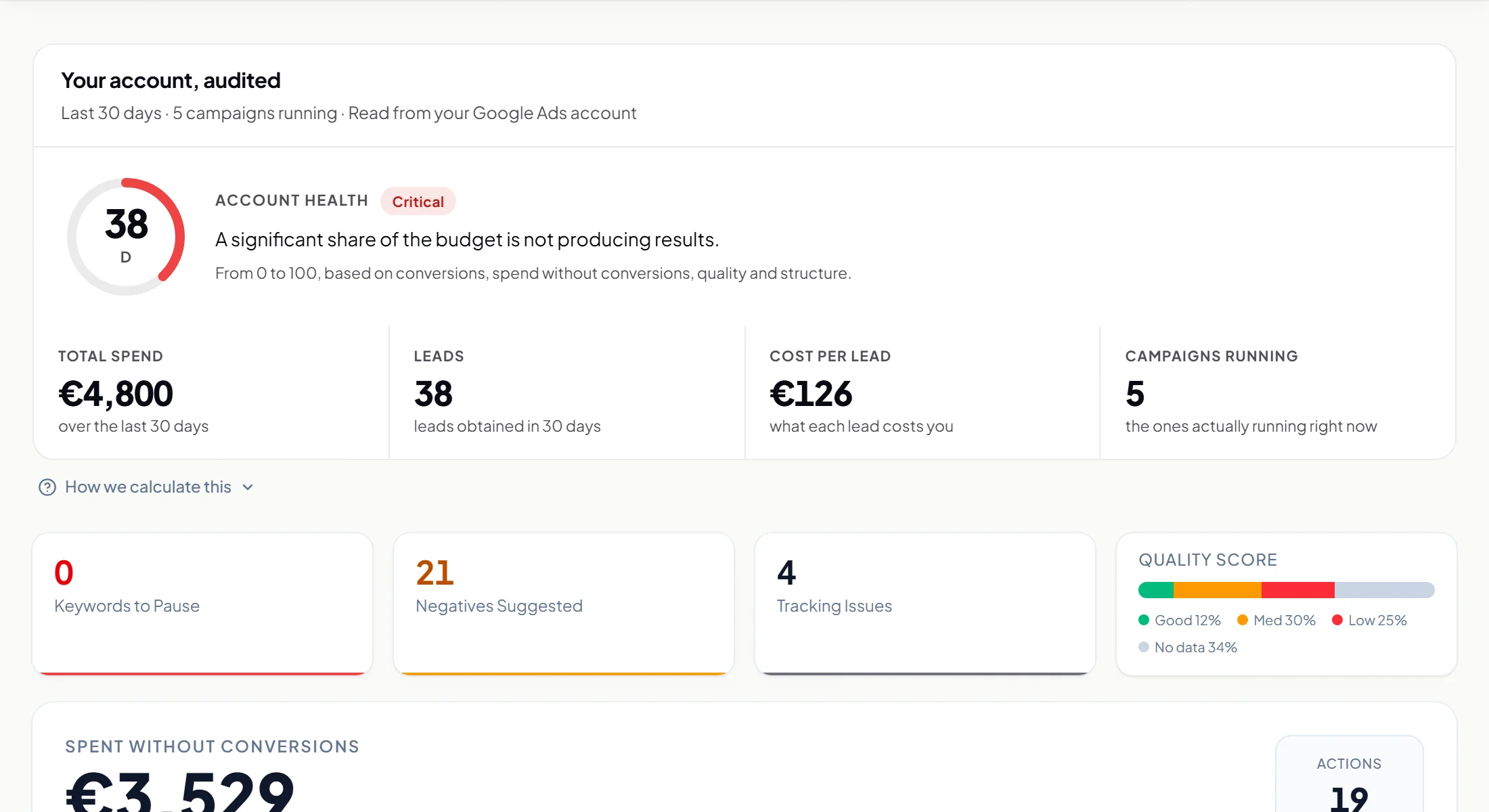 Example account
Three steps and two promises
You connect
With your Google account, we only read. No card.
We read your account
116 checks on your last 30 days. It takes a minute.
You decide
The plan ordered by money, with where to change each thing. Applying it is up to you.
We never touch your account
AdPredictor changes nothing in your account: it reads it and tells you what to change and where.
Nobody will call you
We do not manage anyone's campaigns and there are no salespeople. You get the report and you decide.
What a real Google Ads audit checks
Up to 116 checks, depending on your campaign types, in 7 areas.
Spend without conversions
How much each keyword, each search term and each campaign has spent without any conversion. Your cost per conversion and your cost per click, next to public reference figures from the United States (published in dollars) that are only a guide, and against last month and last year.
Budget and bidding
Campaigns capped or underused, automated bidding without enough data to learn, and how many people never see you because of budget.
Keywords and Quality Score
Up to 10,000 keywords, each with its score, its match type and a verdict: pause, lower the bid, change match type or expand. Plus the ones duplicated across campaigns: Google picks which one shows and you do not get to choose, and they muddle each campaign's figures.
Search terms and negatives
Up to 3,000 real searches you paid for, the negatives you are missing, the converting terms that are not keywords yet, and how much of your spend goes to searches Google does not show.
Ads and landing pages
Your ads one by one, with headlines written from the searches that do convert for you, the ones Google rates poorly and the ones disapproved by its policies. Your pages: we visit up to 10 and, with the Live audit, repeat it every night.
Conversion tracking
What Google counts as a conversion and what may be mismeasured: forms and calls counting several times for the same person, primary goals with no conversions in 30 days, the conversion window and the attribution model that drives bidding.
Targeting, catalogue and structure
Cities and not just regions, schedules and devices that spend without conversions; the Shopping and Performance Max catalogue with its “Everything else” bucket; brand versus generic; whether Google switched on AI Max, and who touched the account in 28 days.
Questions before connecting
The free audit reads your real account and tells you the account health, how much of your last 30 days of spend has brought no conversion recorded in Google Ads and the most important alerts, with the first actions. The Live audit runs all 116 checks with a verdict on every campaign, keyword and search term, the plan in blocks, ordered by the money that goes through each item, proposed ad headlines, PDF and Excel, plus the chat with your data and the nightly watchdog. The first 14 days are free and then you pay a monthly fee you cancel anytime; the price is on the pricing page.
No. Google does not offer a read-only permission for Google Ads, so its consent screen mentions editing and deleting: you will see the same with any tool you connect. AdPredictor changes nothing in your account: it reads it and tells you what to change and where. You can revoke access at any time from your Google account.
No. We never appear as a user or manager of your Google Ads account. You revoke access anytime from your Google account.
Search, Performance Max, Shopping, Display, Demand Gen and Video. We go deepest in Search today; in the other types the detail is lower. If you sell products, the catalogue is reviewed too: which group sells, which only spends and what the “Everything else” bucket takes. The main figures are calculated with your active campaigns; paused ones are listed separately.
Unlike an agency, you don't wait weeks or depend on anyone's calendar: you connect your account and the analysis is ready in minutes, on your real data from the last 30 days. Unlike Google Ads' own recommendations, AdPredictor is independent: it earns nothing if you spend more, and its checks look for spend without conversions, not reasons to spend more. It does not replace execution: the plan tells you what to change and you apply it.
You can, and for one-off questions it is fine. The difference is that an MCP opens the door to your data and you still have to know what to ask, with which thresholds, and come back next week. Here the 116 checks run every time, in the same order, with the numbers computed by a program rather than improvised by an AI; you are told what to change and where; it is delivered as PDF and Excel; and the account is reviewed every night for as long as you stay. And AdPredictor changes nothing in your account: it only reads it. Many MCPs do execute changes.
Sign in with the email that manages them and you see them all in one selector, grouped by manager; you pick one and it gets audited. Each account has its own report, chat and watchdog, and you pay per account. When a client leaves, you freeze that account and it stops counting.
If you do not start the trial, after 48 hours we delete the detail of your account: campaigns, keywords and search terms. If you left your email, it is kept as a contact and you can unsubscribe whenever you like. If you start it, the data is kept for as long as your Live audit lasts so the report stays alive. We comply with GDPR.
What AdPredictor is
- What it is
- AdPredictor is a Google Ads audit that never touches your account: it connects to your account, reads your last 30 days and tells you how much of your spend has brought no conversion recorded in Google Ads, on what (116 checks), and what to change first.
- Who it is for
- For people who run their own Google Ads account (online stores, lead generation, local businesses, SaaS, training) and for agencies and freelancers with several accounts or an MCC who want a second opinion with PDF and Excel.
- What it does not do
- It does not manage campaigns, never makes changes to your account, does not audit Meta or TikTok, and nobody calls you. Questions? Write to us from the contact page.
- What it costs to start
- Nothing: the Free audit asks for no card. The full report comes inside the Live audit, 14 days free and then a monthly fee per account; the price is on the pricing page.
Everything AdPredictor does not do, in detail
- It makes no changes to your account. The audit and chat only read your data and recommend: pausing a keyword, moving budget or changing a bid is always your decision.
- It does not optimise automatically and does not watch in real time. The watchdog reviews your account once every night and emails you if it detects any of the 8 anomalies it tracks (such as spend spikes or zero conversions), but it never acts on its own.
- It cannot see your competitors' bids or budgets. Google's API does not expose them to any tool on the market: distrust anyone who promises that.
- It only audits Google Ads and only the last 30 days. It does not cover Meta or TikTok, does not analyse yearly history, and paused campaigns are excluded from metrics so the diagnosis is not distorted.
- The audit does not audit near-empty accounts: with under 10 EUR of spend in 30 days it returns "insufficient data" instead of making up recommendations.
- The chat is neither unlimited nor a copywriter. It is capped at 30 questions per hour and 300 a month, and does not write long-form marketing content.
See how much of your spend has brought no conversions. Free, in 60 seconds.
To send you the report. No password, no account.
We share your sign-up, encrypted, with ad platforms to measure our ads. Privacy